All documents
Getting started
In organisations
Central console
The model
Security and licences
Documentation › Central console
The central console
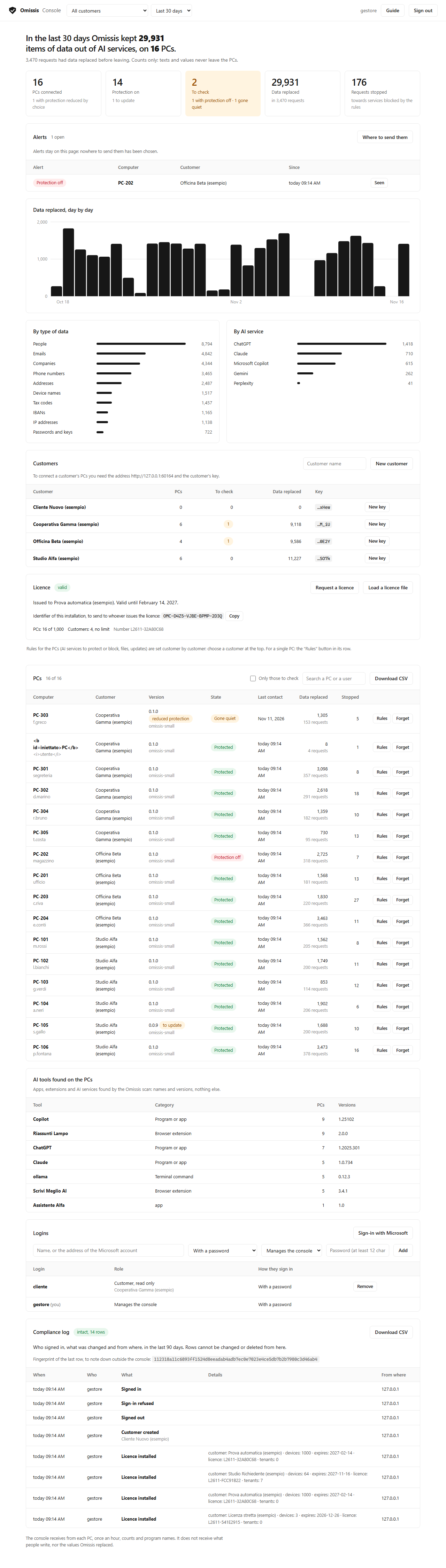
For organisations and MSPs that run Omissis on several PCs: one page that shows, customer by customer, how many PCs have Omissis, which ones need attention (protection off, PCs gone quiet, old versions) and how much data was kept away from AI services, in total, per day, per type of data and per service. It receives counts and program names only: never the texts people write, never the replaced values.
Italiano: README.it.md.
What you do from there
- Rules for the PCs: which AI services to protect or block, files, updates, the ban on turning protection off, set per customer and sent to the PCs that chose to accept them; a single PC can have rules of its own, on top of the customer's. The console can change the rules, not where the PCs send their data.
- Guided tour and guide inside the page: at the first sign-in a one-minute tour lights up the parts of the page one at a time; then the "Guide" button says how far the console is and, topic by topic, "Show me" takes you to the right spot.
- Alerts: a PC that turns protection off, one that goes quiet, a new AI tool. On the page, to a web address (Teams, Slack) or by e-mail.
- Compliance log: who signed in and what they changed, with a CSV to hand to an auditor and a chain of fingerprints that catches altered rows.
- Logins: with a name and password, or with the organisation's Microsoft account (Entra ID).
Free up to 5 PCs
The console is free up to 5 PCs of a single customer, with no time limit and nothing to register. To follow more PCs or more customers you ask for a licence from the console itself ("Licence" card → "Request a licence"): it prepares a file with the identifier of your installation, you send it, you get back a licence file to load in the same card.
It is not open source
The Omissis program that runs on the PCs is open (Apache 2.0) and lives in this repository. The console is a
separate, proprietary program: it is distributed compiled, its source code is not here, and its terms of use
are in LICENSE.md. What the PCs send to it is open and documented (app/central.py, and the panel
of each PC shows the exact summary before it leaves).
Download and install (Windows)
-
Download
omissis-console-<version>.zipfrom the releases page and unzip it on the computer that will act as server (Windows 10/11 or Windows Server; 1 GB of memory is enough). -
From PowerShell opened as administrator, in the unzipped folder:
powershell -ExecutionPolicy Bypass -File .\Install-Console.ps1 -
On that same computer open
https://127.0.0.1:8800/: the page asks you to create your login, then walks you through: a one-minute guided tour, and the first steps (create a customer, give the file to the PCs, wait for the first summary).
By default the console is for the local network: it speaks HTTPS with a certificate it makes itself, and the PCs recognise it by the fingerprint of that certificate. No public name, no ports 80 and 443, nothing else to install. The whole guide, with the Internet-facing setup, backups and troubleshooting, is in GUIDE.md.
What has been tested, and what has not
Automatic tests on a single computer cover the console's calls, the page, the licence, the first start and the compiled package installed without scheduled tasks. Rules, alerts and the log are tested automatically with the real program and fake destinations; sign-in with a Microsoft account only against a fake sign-in service, not with a real organisation. Not tested yet: a PC connecting from another machine on the network, the server restart and the nightly backup, the installation of the compiled package as administrator. The program is not code-signed: Windows may warn when you run it.
The same document in the repository: console/README.md